
Disclosure: #Sponsored by Bluehost. Paid partnership with Bluehost. I earn a commission if you sign up through my links at no extra cost to you. Bluehost provided access to their tools for review purposes, but all opinions, test builds, and evaluations in this guide reflect real, independent testing. #sponsoredbybluehost
Setting up a business website used to mean picking a WordPress theme, fighting with visual page builder blocks, configuring mobile responsive breakpoints manually, and hunting down compatible plugins. For non-technical founders and small teams, that process often turns a weekend project into a multi-week technical chore.
Bluehost recently replaced its older tool with Bluehost AI Builder—a natural language website generator designed to turn a single sentence into a working, responsive site without writing code or manually wiring up hosting infrastructure.
Unlike many AI website tools that lock generated drafts behind immediate paywalls or demand credit card details before you see a single layout, Bluehost AI Builder is $0 to start, no credit card required.
In this hands-on test on StudyWarehouse, I put Bluehost AI Builder through a full build cycle: prompting a prototype from scratch, testing chat-based design revisions, evaluating the credits system, and publishing live. Here is how it works, where it excels, and what you need to know before choosing a plan.
What Is Bluehost AI Builder?
Bluehost AI Builder is a prompt-to-website platform. Instead of starting with a blank canvas or generic theme template, you describe your business in plain English. The AI generates a customized layout complete with contextual headlines, draft copy, relevant stock photography, working navigation, and contact forms.
Once the initial version renders, you don’t edit it using drag-and-drop coordinate grids. Instead, you chat with the builder to refine specific sections, adjust styling palettes, change typography, or add secondary pages.
Key Characteristics at a Glance
- Pricing: $0 to start, no credit card required on the Free plan; paid plans from $20/mo.
- Hosting: Fully managed cloud hosting is included on every tier and never consumes generation credits.
- Outputs: Multi-page business websites, landing pages, personal portfolios, consultant hubs, and content blogs.
- Under the Hood: Cloud-backed web architecture with mobile responsiveness configured out of the box.
- Ecommerce Distinction: Bluehost AI Builder focuses strictly on lead generation, service businesses, and informational sites. If you need a transactional storefront to sell physical or digital inventory with payment gateways, Bluehost directs users to Bluehost AI Store instead.
Hands-On Walkthrough: From One Sentence to Live Subdomain
The build process follows five sequential steps: Describe, Refine, Watch it build, Publish, and Manage.
Step 1: Prompting the Concept
To begin, you create an account using Google, Apple, GitHub, or an email address. Because the Free tier requires no credit card, you enter the builder workspace immediately.
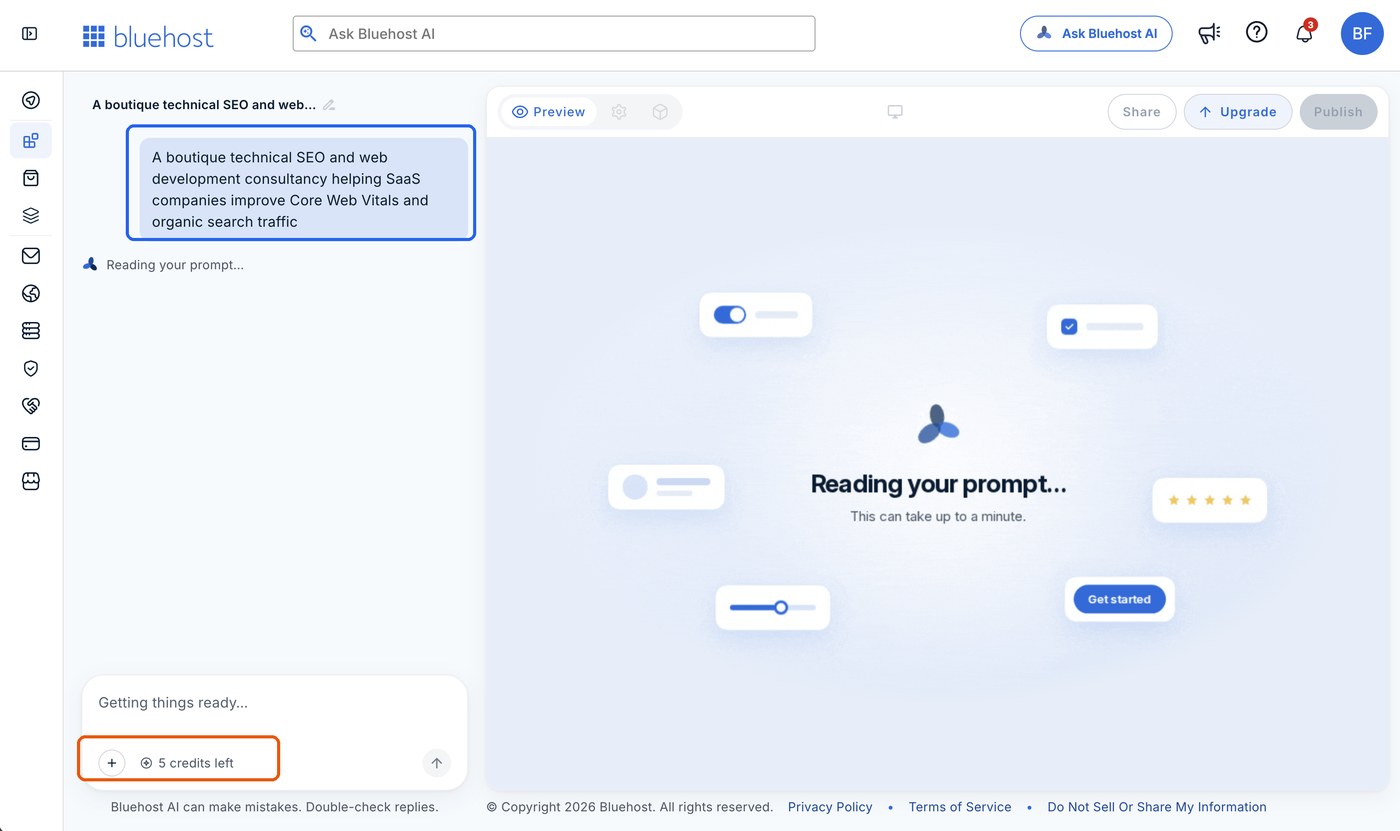
You initiate the build by typing a single sentence describing your venture. For this test, I prompted:
“A boutique technical SEO and web development consultancy helping SaaS companies improve core web vitals and organic search traffic.”
The AI parses the prompt and asks 2–3 brief clarifying questions (such as preferred visual aesthetic, brand tone, or specific services offered). Crucially, the AI’s clarifying questions are completely free and do not consume your daily generation credits.
Step 2: Watching the Prototype Generate
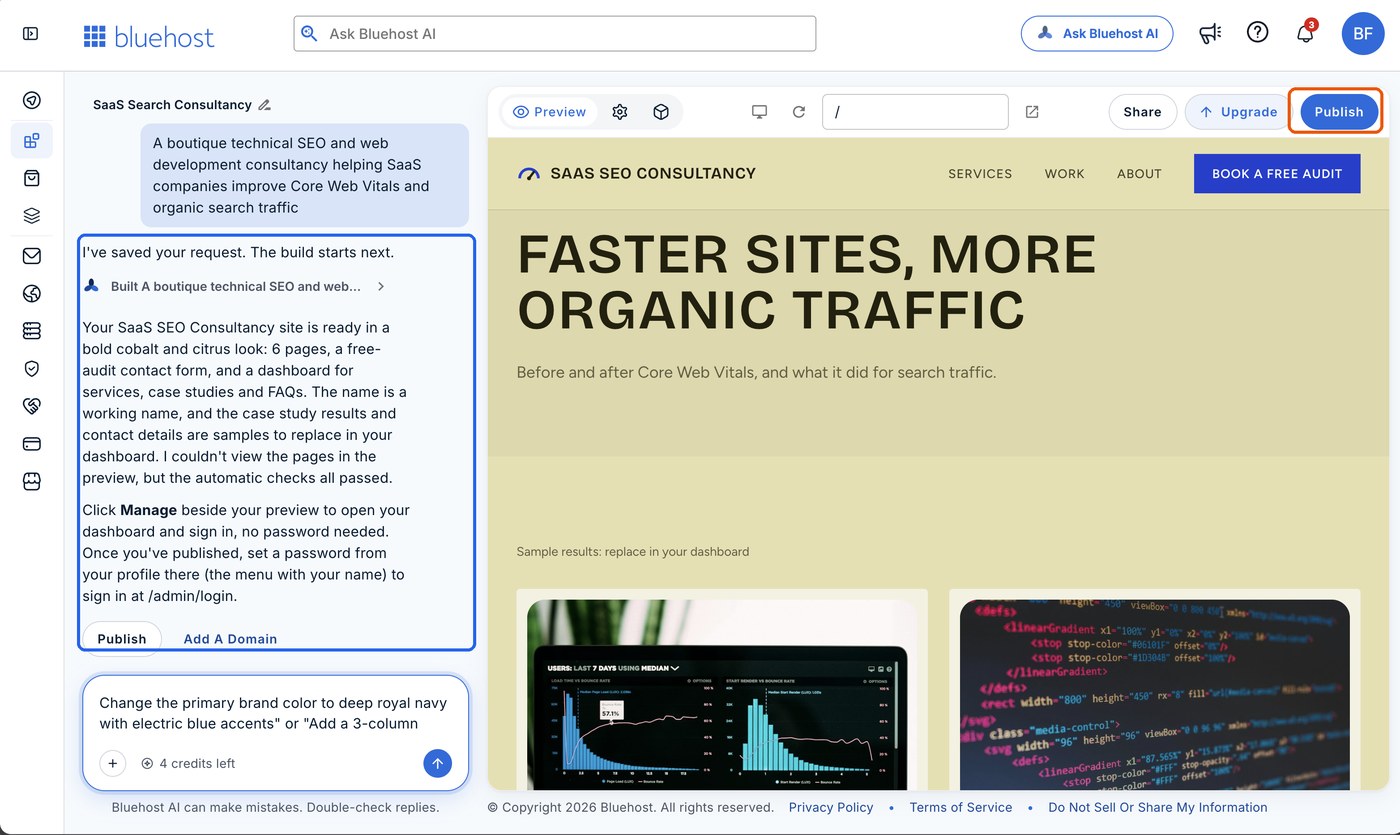
After confirming the service scope, Bluehost AI Builder constructs the entire website structure in real time. Within roughly 60 to 90 seconds, it outputs:
- A cohesive homepage layout with a hero banner, value proposition badges, and call-to-action buttons.
- A structured service breakdown detailing technical audits, speed optimization, and architecture consulting.
- An “About” section with placeholder executive credentials.
- A functional, responsive contact form connected to an inbound lead capture mechanism.
The generated copy avoids generic Lorem Ipsum. Instead, it populates industry-relevant terminology based on the initial prompt.
Step 3: Conversational Refinements and Edits
This is where Bluehost AI Builder differs from legacy site builders. Rather than navigating deep CSS menus to change button radiuses or font weights, you command changes directly through the chat sidebar:
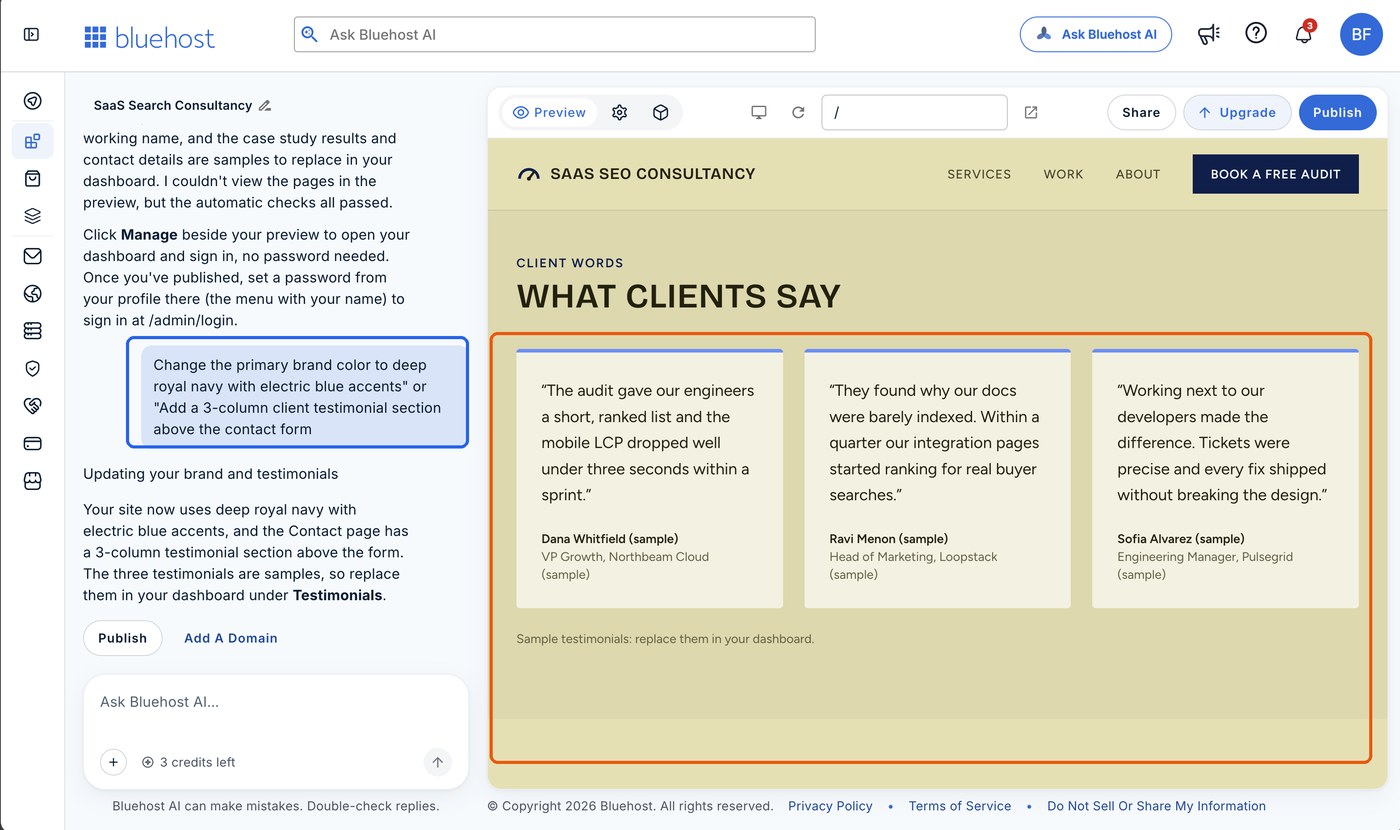
- “Change the primary brand color from slate grey to deep royal navy with electric blue accents.”
- “Add a 3-column client testimonial section right above the contact form.”
- “Make the hero headline punchier and emphasize 100% Core Web Vitals compliance.”
As you submit each chat instruction, the live preview updates dynamically. You can toggle between desktop, tablet, and mobile viewport tabs at the top of the interface to inspect responsive typography and navigation drawer behavior before pushing changes live.
You can also upload your own logos or high-resolution images (PNG, JPG, or WebP up to 5 MB each), or provide a reference URL to guide the visual tone.
Step 4: Publishing Live
When you are satisfied with the draft, clicking Publish deploys the site to the web.
On the Free plan, your website publishes directly to a live, secure Bluehost subdomain:
https://yourname.app.bluehost.ai
The published URL includes an SSL certificate and is fully accessible to anyone on desktop or mobile. Connecting an apex custom domain (such as yourbrand.com) requires upgrading to one of the paid tiers (paid plans from $20/mo).
How the Credits System Actually Works
Bluehost AI Builder uses an action-based credit model for generative operations. Understanding this model prevents surprises during site updates.
| Plan | Monthly Billing | 12-Month Annual Billing | AI Credits Included | Key Limits & Renewals |
|---|---|---|---|---|
| AI Builder Free | $0 (No card) | $0 (No card) | 5 / day (up to 30/mo) | Publishes on yourname.app.bluehost.ai; chat updates; 24/7 support. |
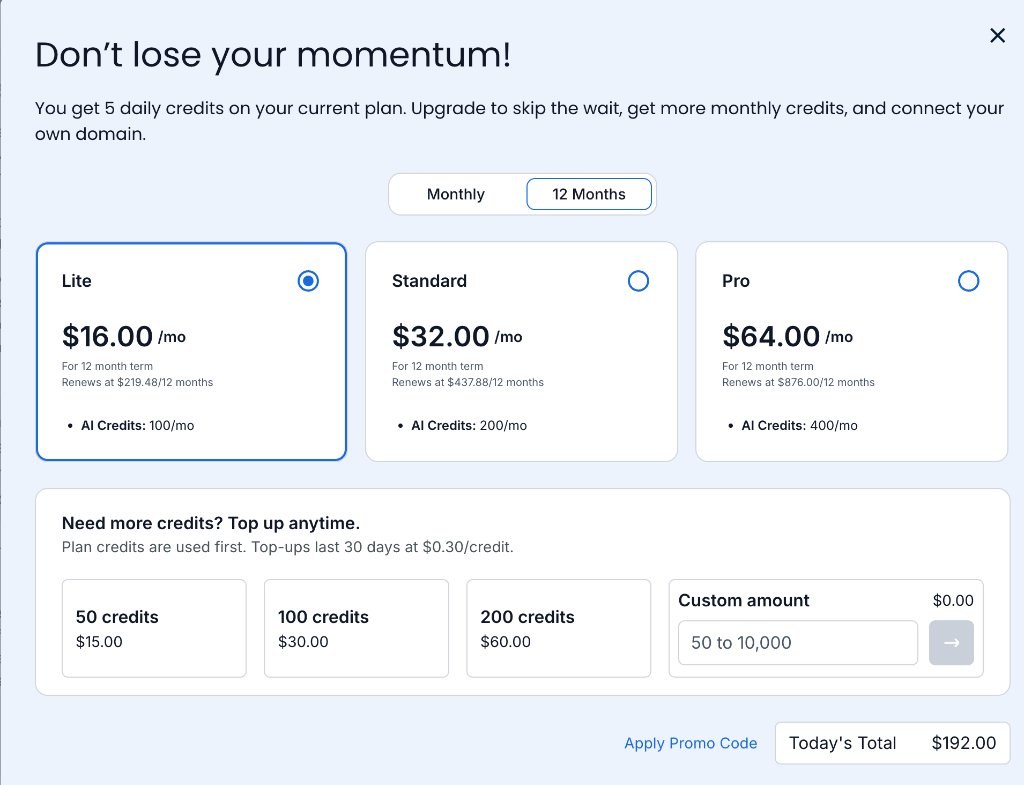
| AI Builder Lite | $20.00 / mo | $16.00 / mo ($192.00/yr) | 100 / mo | Connect custom domain; hosting included; annual renews at $219.48/12 mo. |
| AI Builder Standard | $40.00 / mo | $32.00 / mo ($384.00/yr) | 200 / mo | Double monthly credits; annual renews at $437.88/12 mo. |
| AI Builder Pro | $80.00 / mo | $64.00 / mo ($768.00/yr) | 400 / mo | High-volume agency tier; annual renews at $876.00/12 mo. |
Crucial Credit Rules to Understand
- One Message = One Credit: Each instruction you send in chat to generate, redesign, or add a section uses 1 credit. Clarifying questions initiated by the AI remain free.
- Credits Expire in 30 Days: Unused monthly plan credits and optional top-up packs (50 credits for $15, 100 for $30, 200 for $60, or custom 50–10,000 packs at $0.30/credit; plan credits are used first) do not roll over indefinitely.
- Hosting Never Consumes Credits: Your site’s regular web traffic, visitors, pageviews, and server bandwidth never drain your credit pool.
- Running Out of Credits Never Takes Your Site Down: If you exhaust your monthly credits or daily free allowance, your published website stays 100% online. The only thing that pauses is your ability to generate new AI modifications until your credits refresh or you add a top-up pack. This provides stability for live businesses.
Core Strengths: Where Bluehost AI Builder Excels
1. Zero Financial Risk to Prototype ($0 to Start)
Most traditional hosting providers require an upfront annual commitment before you can interact with their site creation tools. Bluehost allows founders, freelancers, and small businesses to spin up, test, refine, and publish a functional prototype on a free subdomain with zero payment credentials entered.
2. Elimination of Plugin and Theme Conflicts
Because Bluehost manages the entire runtime environment, you do not face the typical WordPress maintenance hurdles—broken PHP dependencies, plugin security vulnerabilities, or conflicting shortcodes. The AI handles visual rendering natively.
3. Built-In Technical Cleanliness
Generated pages include structured semantic HTML: proper H1 through H3 heading hierarchies, automated descriptive image alt attributes, clean meta titles, and fast mobile viewport tags. While search engine positions naturally depend on competition, backlink profiles, and content quality—and no website builder can ever promise or guarantee search rankings—the underlying markup provides a clean technical baseline.
4. 24/7 Human Support Safety Net
Unlike standalone AI tools operated by small venture startups with automated email bots, Bluehost provides 24/7 live human customer support for domain routing, DNS setup, and hosting questions. For complex site customizations, Bluehost also offers dedicated Professional Services.
Constraints and Considerations
To make an informed decision, keep the following architectural boundaries in mind:
- Custom Domains Require a Paid Plan: While publishing on
yourname.app.bluehost.aiis free, running a professional brand under your own.comor.orgdomain requires an upgrade to paid plans from $20/mo. - No Native Ecommerce in AI Builder: Bluehost AI Builder is engineered for lead generation, portfolio presentation, and content publishing. It does not contain shopping carts or checkout inventory engines. For direct online product sales, utilize Bluehost AI Store.
- No Native App Store Exports: The builder produces mobile-responsive web applications and sites accessible via browsers; it does not compile native iOS (
.ipa) or Android (.apk) binaries.
Frequently Asked Questions
Can I try Bluehost AI Builder without entering payment details?
Yes. Bluehost AI Builder is $0 to start, no credit card required. You can build, edit, and publish your website to a live .app.bluehost.ai subdomain on the Free tier.
What happens when I use all my monthly credits?
Your live published website remains active, visible, and fully accessible to visitors. Running out of credits only temporarily pauses new conversational AI revisions until your next monthly refresh or until you choose to top up.
How much do custom domain plans cost?
Connecting a custom domain you own (or registering a new one) requires an upgraded tier, with paid plans from $20/mo on the AI Builder Lite tier.
Is Bluehost AI Builder the same as the old AI Website Builder?
No. Bluehost AI Builder is an entirely new product replacing the legacy AI Website Builder. New customers onboard directly onto AI Builder.
Verdict: Should You Use Bluehost AI Builder?
If you are a freelancer, consultant, agency owner, or small business founder who needs a polished, responsive website live by tonight—without getting bogged down in template configuration or manual coding—Bluehost AI Builder offers one of the most accessible starting points currently available.
The ability to test the builder, experiment with chat-driven layout revisions, and view a live published prototype on the Free plan makes it an easy recommendation to try.
Ready to Try Bluehost AI Builder?
Start building free on Bluehost AI Builder ($0 to start, no credit card needed) →